If you use ICON Direct for eTexts, here are some important updates for fall 2026 that will help you navigate eText questions from students.
VitalSource eReader
Over the summer, ICON Direct updated to the VitalSource eReader. The first time students access eTexts through the ICON Direct eTexts link, they will need to accept the terms of use and enable third party cookies
VitalSource has some great features to help support student learning:
- Text to Speech–change the voice and playback speed or switch to simplified reading mode, which skips footnotes, image descriptions, and URL hyperlinks.
- Highlights, Margin Notes, and Bookmarks–mark places and important terms to assist with study sessions. Instructors and students can share highlights with others.
- Flashcards–a study tool that allows students to create their own flashcards and use them to quiz themselves. students will value such as text to speech, notes, bookmarks, and flashcards.
Learn more about the eReader on the OTLT website.
New location for opt out tool
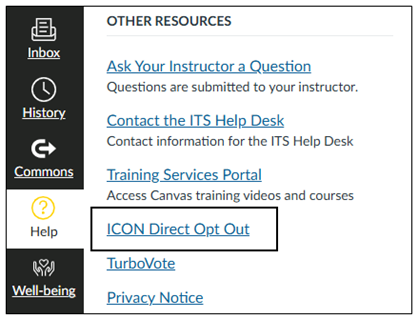
Students may choose to opt out, but they will lose access to the materials. Students can access the ICON Direct opt out tool in the Help Menu of their ICON courses. The location changed after the ICON Dashboard was decommissioned over the summer.
Please contact the ITS Help Desk for technical assistance or email icon-direct@uiowa.edu for ordering inquiries.